Sage Cloud Hosting Complete Guide for Businesses and Accounting Firms
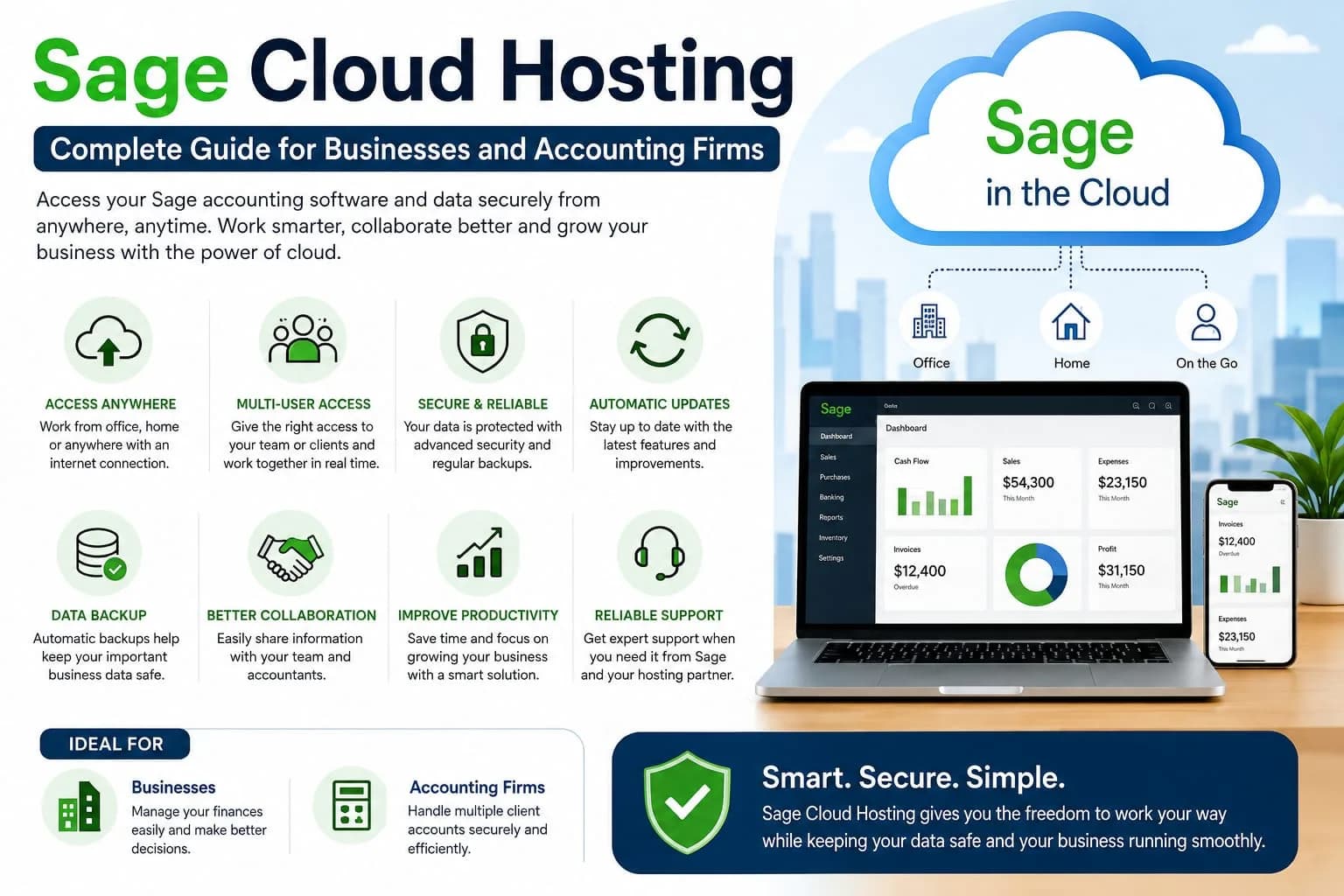
Sage Cloud Hosting for Businesses and Accounting Firms
Sage Cloud Hosting is becoming an important choice for businesses that want easier access to their accounting work. Many companies still depend on desktop accounting software because they are comfortable with it. The problem starts when people need to work from different places.
Cloud hosting can solve this problem by moving the software and business data to a secure cloud environment. This allows approved users to work with their accounting system without being tied to one office computer. Sage offers different cloud connected and cloud based solutions for small and medium sized businesses. Sage 50 can combine desktop accounting features with cloud access. Sage also offers products such as Sage Intacct for businesses with more advanced financial needs.
What Is Sage Cloud Hosting
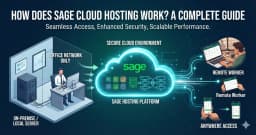
Sage Cloud Hosting means using Sage accounting software through a cloud environment instead of keeping the complete setup on one local computer. In a hosted setup the software and data can be placed on remote cloud servers. Users can then connect to the system through the internet. This can make accounting work easier for people who work from home or different offices. It can also help accounting firms that need to work with client accounts from different locations. Sage has also introduced Sage 50 Cloud with features such as remote access and cloud hosting. It includes automatic updates and backups along with real time collaboration.
Why Businesses Are Moving Toward Cloud Hosting
The way people work has changed a lot in recent years. Many employees no longer work from one office every day. Business owners may travel between offices. Accountants may work from home. Accounting firms may manage financial work for clients in different cities.
A traditional desktop setup can make this work harder. Cloud hosting gives businesses more flexibility. Users can access their accounting environment from different locations when they have the right access and a reliable internet connection. Sage also explains that cloud accounting can help businesses access financial information from different devices and locations.
Easy Access From Different Locations
One of the biggest advantages of Sage Cloud Hosting is remote access. Imagine that your accounting team is working from the office while your business owner is travelling. With a suitable cloud setup the owner can still access important financial information. An accountant can also work with company data without sitting in the same office. Drake Remote Hosting Data Access is designed to help users work away from their main location. Sage says it can allow businesses to work from home and can also help accountants access client data. This makes cloud access useful for modern businesses.
Better Work For Accounting Firms
Accounting firms can benefit greatly from cloud based accounting systems. An accounting firm may have many clients. Each client may have different financial information and different accounting needs. Cloud access can make communication easier between the accountant and the client.
Instead of waiting for a client to send files the accountant can use an approved remote access system when the setup supports it. Sage provides options for giving accountants and bookkeepers remote access to company data. This can reduce delays and make everyday accounting work more convenient.
Multi User Access
Many businesses have more than one person working with financial information. A business owner may need access to reports. An accountant may manage transactions. Another employee may handle invoices and expenses.
A suitable Sage cloud plan can support multiple users depending on the product and subscription. Sage 50 Cloud offers real time collaboration. Some plans also provide user permissions and support for larger accounting teams. This means businesses can give people access based on their role. Good user management is important because not every employee needs access to every part of the accounting system.
Security Is Important
Accounting data contains important business information. This can include financial records. Customer information. Employee information. Payment details and other sensitive records. For this reason security should be a major part of any cloud hosting decision.
Sage provides security features for its cloud products. Sage 50 also includes security tools designed to help protect business information. Businesses should also follow basic security practices. Strong passwords should be used. User access should be reviewed regularly. Devices should be protected. Only trusted people should receive access to ProSeries Hosting company accounts. Cloud hosting can improve access but security still depends on good account management.
Automatic Updates
Software updates are important for accounting systems. Old software can create problems when businesses need new features or security improvements. Cloud based Sage solutions can reduce the amount of manual maintenance needed by the business.
Sage 50 Cloud Hosting includes automatic updates and backups according to Sage. This can save time for businesses that do not want to manage software updates themselves. It also means the accounting team can spend more time on actual financial work.
Data Backup
Losing accounting data can create serious problems for a business. A good cloud setup should include a reliable backup system. Sage 50 Cloud includes automatic backups as part of its cloud features. Backups can help businesses recover important information if something goes wrong. Still businesses should understand how their chosen service handles backups and recovery. They should also know how long backups are kept and how data can be restored.
Accounting From Home
Remote work is now common for many accounting professionals. A person may not want to travel to the office just to check an invoice or review a report. Cloud hosting can make this easier. With the right setup users can work from home while still accessing the accounting environment. This can also help businesses hire employees who live in different areas. For Sage 100 ERP Cloud Hosting accounting firms this flexibility can make daily work more convenient.
Better Collaboration With Clients
Communication between accountants and clients is an important part of financial work. Cloud access can reduce the need to move files manually. Sage Remote Data Access can allow approved users to connect to company data from different locations. Sage also explains that this service can help accountants access client data without carrying files between locations. This can make accounting work more organized. It can also reduce the chance of people working on old copies of financial files.
Sage Cloud Hosting For Small Businesses
Small businesses often have limited time and limited technical resources. They need accounting software that is simple and reliable. Sage 50 is designed for small businesses and offers tools for invoices. Expenses. Cash flow. Payments. Inventory and reporting. Cloud access can make these tools easier to use from different locations.
A small business owner can check financial information without always being in the office. This can be useful for business owners who travel or manage more than one location.
Sage Cloud Hosting For Growing Businesses
Growing businesses usually need more than basic accounting. They may have more employees. More customers. More transactions and more complicated financial requirements. Cloud systems can make it easier to support a growing team.
Sage offers different products for different business sizes. Sage 50 Hosting is aimed at small businesses while Sage Intacct is designed for businesses with more complex accounting requirements. This gives businesses different options as their needs change.
Is Sage Cloud Hosting Expensive
The total cost depends on the Sage product and the plan selected. Businesses should not look only at the monthly software cost. They should also think about user requirements. Support. Backup. Security. Maintenance and future growth. A cloud system can sometimes reduce the need for local servers and technical maintenance. For a business that already has a strong local setup the change may not always be necessary. The right choice depends on the way the company works.
Things To Check Before Choosing Sage Cloud Hosting
Before moving to a cloud setup businesses should understand their needs. First check which Sage 100 Hosting product you currently use. Then check whether your required features are available in the cloud version. Look at the number of users who need access. Check how user permissions work. Ask about backups and security. Check what support is available if there is a problem. Also make sure your internet connection is reliable enough for daily accounting work. These simple checks can prevent problems later.
Final Thoughts
Sage Cloud Hosting can be a useful solution for businesses and accounting firms that want more flexibility. It can help people work from different locations. It can support collaboration and it can reduce some of the maintenance work connected with traditional accounting setups. For accounting firms the ability to give approved accountants and bookkeepers remote access can make client work easier. For small businesses cloud access can provide more freedom while keeping important accounting work in one place.
Sage offers different cloud connected and cloud native solutions. This means businesses should choose the product that matches their size and accounting needs. The main goal is simple. Your accounting Cloud Hosting Provider system should make business work easier rather than create more problems. If your team needs remote access and better collaboration then Sage Cloud Hosting can be worth considering. A careful review of your users. Features. Security needs and budget can help you choose the right setup for your business.