How Does Sage Cloud Hosting Work? A Complete Guide
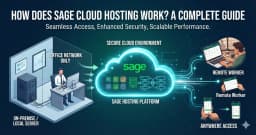
How Does Sage Cloud Hosting Work? A Complete Guide
Businesses need reliable accounting software to manage invoices, expenses, financial records, reporting, payroll, and other important financial tasks. As remote and hybrid work become more common, businesses also need flexible ways to access their accounting software from different locations.
This is where Sage Cloud Hosting can help.
But how does Sage Cloud Hosting actually work?
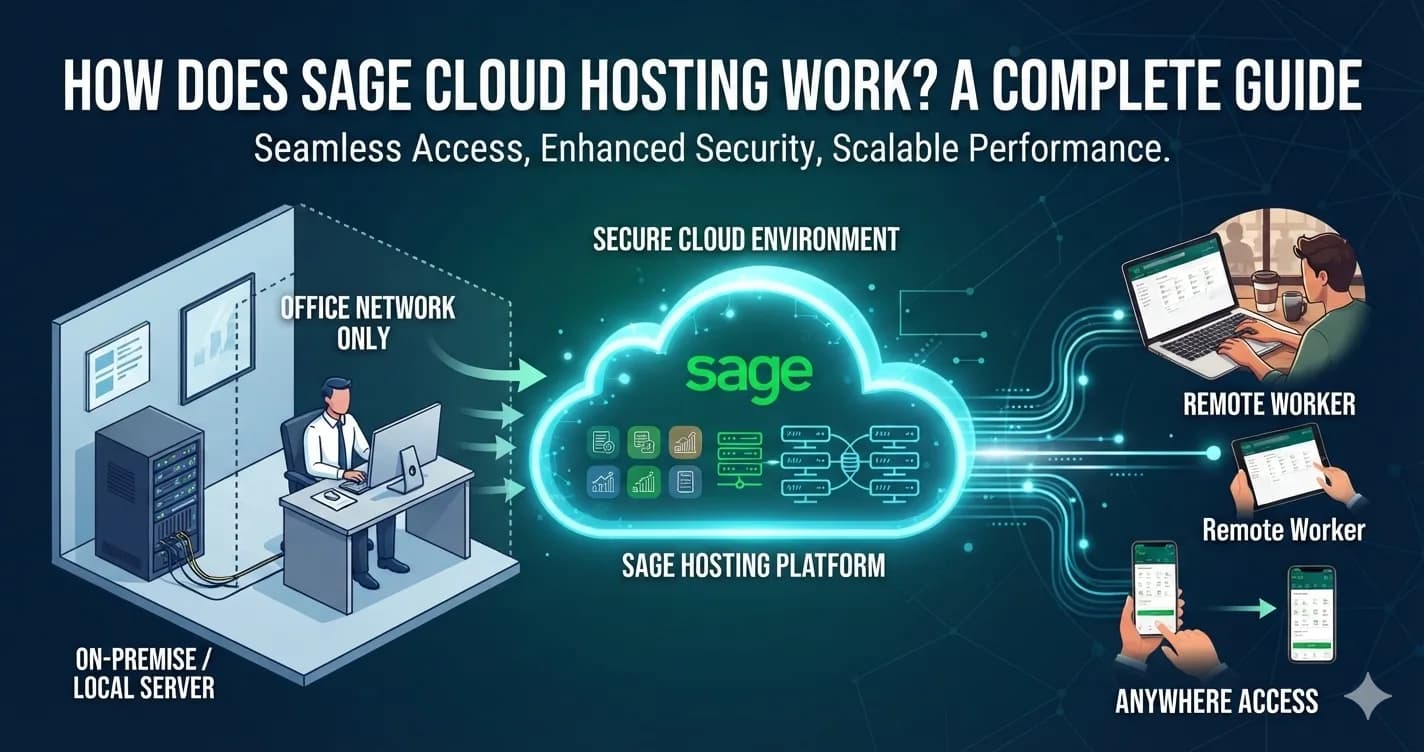
In simple terms, Sage Cloud Hosting allows supported Sage accounting software and business data to be accessed through a cloud-based or hosted environment. Instead of depending only on a computer in the office, authorized users can access their accounting applications remotely.
In this guide, we will explain how Sage Cloud Hosting works, its benefits, the difference between cloud hosting and Remote Data Access, and what businesses should consider before choosing a hosting solution.
What Is Sage Cloud Hosting?
Sage Cloud Hosting refers to using Sage accounting software through a cloud-based environment.
Depending on the specific Sage product and service, the software and data may be hosted in the cloud, or cloud features may provide remote access and data sharing.
For businesses using a fully hosted environment, the Sage application and company data are maintained on remote infrastructure. Authorized users can then connect to the hosted environment over the internet.
This can provide businesses with a flexible way to work with their accounting software from different locations.
Sage’s current US offering describes Sage 50 Cloud as providing cloud-based access, automatic updates, real-time collaboration, and automated backups.
How Does Sage Cloud Hosting Work?
The basic process is straightforward.
Step 1: Sage Software Is Set Up in a Cloud Environment
The supported Sage application is configured in a cloud or hosted environment. Depending on the service, this may involve Sage’s own cloud service or a third-party hosting provider.
Step 2: Business Data Is Configured
The company’s accounting data is prepared for the selected cloud environment. This can include company files, accounting records, user information, and other required data. Before moving important financial information, businesses should always create a verified backup.
Step 3: Users Are Added
The business can set up authorized users who need access to the Sage environment.
User permissions can be configured based on the requirements of the business.
For example, an accounting manager may require different access from a regular employee.
Step 4: Users Connect Remotely
Once the environment is ready, authorized users can access the Sage application or shared data through the supported connection.
This allows employees to work from different locations instead of being limited to one office computer.
Step 5: Work Is Performed in the Hosted Environment
Users can perform their normal accounting tasks, such as:
- Managing invoices
- Recording expenses
- Reviewing financial information
- Creating reports
- Managing customers and vendors
- Handling accounting records
- Working with business data
The exact features depend on the Sage product and subscription.
Step 6: Data Is Backed Up or Synchronized
The way data is handled depends on the type of cloud solution.
A fully hosted environment can keep the application and data in the cloud, while Remote Data Access can synchronize a copy of Sage data between computers and cloud infrastructure.
This distinction is important when comparing different Sage cloud solutions.
Sage Cloud Hosting vs. Sage Remote Data Access
These terms can sometimes cause confusion.
Sage Cloud Hosting and Sage Remote Data Access are not necessarily the same thing.
With a fully hosted solution, the application can be hosted on a remote server and users can access the hosted environment remotely.
With Sage Remote Data Access, Sage documentation explains that users can share company data through the cloud while Sage 50 remains installed on the computers accessing the data.
In other words:
| Feature | Sage Cloud Hosting | Sage Remote Data Access |
|---|---|---|
| Application | May be hosted remotely | Sage remains installed locally |
| Data | Can be hosted remotely | Data is shared/synchronized through the cloud |
| Remote access | Yes | Yes |
| Local Sage installation | Depends on hosting setup | Required |
| Best for | Businesses wanting a hosted application environment | Businesses wanting remote access to Sage data |
| Infrastructure | Cloud/hosting environment | Sage cloud synchronization service |
Businesses should confirm exactly what a provider means by “Sage Cloud Hosting” before purchasing a service.
Benefits of Sage Cloud Hosting
1. Remote Access
One of the main benefits of cloud hosting is the ability to access Sage from different locations.
Employees can work from home, another office, or another location without being physically connected to the company’s local network.
2. Flexible Working
Cloud hosting can support businesses with remote and hybrid employees.
Accounting professionals can access their software remotely and continue working with business financial information.
3. Centralized Environment
A hosted environment can provide a centralized location for the application and associated data.
This can simplify access for businesses with employees working across multiple locations.
4. Support for Multiple Users
Depending on the Sage product, licensing, and hosting configuration, multiple authorized users can work with the hosted environment.
This can be useful for accounting departments, CPA firms, and businesses with distributed teams.
5. Automated Updates
Some cloud services include automatic software updates, reducing the need for businesses to manually manage every update.
Sage’s current Sage 50 Cloud offering lists automatic updates as one of its included features.
6. Backup Options
Cloud-based Sage solutions can include backup functionality depending on the service.
For example, Sage currently lists automated backups with Sage 50 Cloud.
Businesses should still understand the provider’s backup frequency, retention, and recovery policies.
Sage 50 Cloud Hosting
Sage 50 Hosting provides businesses with a way to access supported Sage 50 accounting software through a hosted environment.
For small and medium-sized businesses, Sage 50 can be an important part of daily accounting operations.
A hosted environment can help businesses access Sage 50 remotely while supporting accounting workflows across different locations.
Sage 50 Cloud Hosting for Accountants
Accounting professionals often need access to financial information from different locations.
Sage 50 Hosting for Accountants can provide a flexible working environment for accountants and bookkeeping teams using supported Sage 50 applications.
Before selecting a hosting plan, accountants should consider:
- Number of users
- Software version
- Client data requirements
- Remote access requirements
- Security
- Backup
- Technical support
Sage 100 Cloud Hosting
Businesses using Sage 100 can explore Sage 100 Hosting for remote access to supported Sage 100 applications.
Sage 100 Cloud Hosting can support businesses that need access to accounting and business management applications from different locations.
The hosting requirements may depend on the number of users, database size, Sage modules, integrations, and business workflows.
Sage 100 ERP Cloud Hosting
Sage 100 is used by businesses for accounting and broader business management requirements.
Sage 100 ERP Cloud Hosting can provide a hosted environment for businesses that need remote access to supported Sage 100 applications.
Before moving Sage 100 to a hosted environment, businesses should confirm software compatibility, database requirements, integrations, licensing, and user access.
What Do You Need for Sage Cloud Hosting?
The exact requirements depend on the Sage product and hosting solution.
However, businesses should generally consider the following:
Compatible Sage Software
Confirm that your Sage product and version are supported by the hosting environment.
Internet Connection
Users need a reliable internet connection to access cloud-based or hosted applications.
User Accounts
Each person who needs access should have the appropriate user account and permissions.
Software Licensing
Confirm that your Sage software licensing supports your selected setup and number of users.
Data Backup
Create a verified backup before migration or major configuration changes.
Security
Use strong passwords, appropriate permissions, secure devices, and other recommended security practices.
Is Sage Cloud Hosting Secure?
Security should be one of the most important factors when choosing a Sage Hosting Provider.
Accounting systems contain sensitive financial and business information.
Before selecting a provider, ask about:
- User authentication
- Access permissions
- Encryption
- Network security
- Monitoring
- Data backups
- Disaster recovery
- Data retention
- User management
A hosting provider should clearly explain how the environment is protected and what responsibilities remain with the business.
How to Choose the Best Sage Hosting Provider
Not every hosting provider offers the same infrastructure or services.
When comparing providers, consider the following.
1. Software Compatibility
Make sure the provider supports your Sage product and version.
2. Performance
Ask about server resources, infrastructure, storage, and performance monitoring.
3. Security
Review the provider’s security practices and access controls.
4. Backup and Recovery
Understand how frequently backups are created and how data can be restored.
5. User Capacity
Check how many users are supported and whether simultaneous access is available.
6. Technical Support
Make sure support is available through channels that work for your business.
7. Pricing
Compare the complete cost, including hosting, software licensing, users, storage, support, and migration services.
Sage Cloud Hosting vs. Local Sage Installation
Businesses can also compare cloud hosting with keeping Sage software on local computers or servers.
| Feature | Local Sage Setup | Sage Cloud Hosting |
|---|---|---|
| Application location | Local computer/server | Cloud/hosted environment |
| Remote access | Additional setup may be required | Designed for remote access |
| Infrastructure | Managed by business | Managed by hosting provider, depending on service |
| Updates | Business-managed | May be included depending on service |
| Backup | Business-managed | Depends on hosting plan |
| Remote teams | More complex | Generally more flexible |
| Scalability | Depends on local infrastructure | Can be adjusted based on hosting plan |
The right option depends on the business’s software requirements, infrastructure, budget, and working environment.
How Much Does Sage Cloud Hosting Cost?
There is no single price for Sage cloud hosting.
The cost can depend on:
- Sage software edition
- Number of users
- Hosting infrastructure
- Storage
- Backup services
- Technical support
- Migration requirements
- Additional applications
- Software licensing
Businesses should request a complete quote and compare the total cost rather than choosing a provider based only on the lowest advertised price.
Why Consider Winscloud Matrix for Sage Cloud Hosting?
Winscloud Matrix provides cloud hosting solutions for businesses and accounting professionals that need remote access to accounting applications.
Businesses can explore Sage 50 Hosting for supported Sage 50 requirements and Sage 100 Hosting for supported Sage 100 applications.
When selecting a hosting solution, businesses should evaluate compatibility, user requirements, security, backup options, performance, support, and pricing.
Frequently Asked Questions
What is Sage Cloud Hosting?
Sage Cloud Hosting allows supported Sage accounting software and/or data to be accessed through a cloud-based environment. The exact setup depends on the Sage product and hosting service.
How does Sage Cloud Hosting work?
The Sage application and data are configured in a cloud or hosted environment, authorized users are provided access, and users connect remotely through the internet to work with the application or data.
Is Sage Cloud Hosting the same as Remote Data Access?
No. Remote Data Access can synchronize or share Sage data through the cloud while Sage remains installed on users’ computers. A fully hosted solution can place the application and data in a remote hosting environment.
Can I access Sage from home?
Yes. Supported cloud and remote-access solutions can allow authorized users to access Sage from home or other locations, subject to the product and service configuration.
Can multiple users access Sage Cloud Hosting?
Multiple users may be supported depending on the Sage product, licensing, hosting configuration, and provider.
Is Sage Cloud Hosting secure?
Security depends on the specific service and provider. Businesses should review authentication, access controls, encryption, monitoring, backup, and recovery policies.
Can accountants use Sage Cloud Hosting?
Yes. Sage cloud and hosted solutions can support accountants and bookkeeping teams that need remote access to supported Sage applications.
Can Sage 50 be hosted in the cloud?
Yes. Sage currently offers Sage 50 Cloud, and compatible third-party hosting solutions may also be available depending on the product and requirements.
Can Sage 100 be hosted?
Supported Sage 100 environments can be deployed in hosted or cloud infrastructure depending on the hosting provider and technical requirements.
How much does Sage Cloud Hosting cost?
Pricing varies according to the Sage product, number of users, infrastructure, storage, support, backup, licensing, and other requirements.
Final Thoughts
Sage Cloud Hosting provides businesses with a flexible way to access accounting software and financial information from different locations.
The way cloud hosting works can vary depending on the Sage product and service. Some solutions provide a fully hosted application environment, while others, such as Remote Data Access, provide cloud-based data sharing while the Sage software remains installed locally.
Before choosing a Sage Hosting Provider, review software compatibility, user requirements, security, backup, performance, technical support, and pricing.
If your business is exploring remote access to Sage software, you can explore Sage 50 Hosting and Sage 100 Hosting from Winscloud Matrix.