How Much Does Sage 100 Contractor Cost? Pricing, Licensing & Hosting Guide

How Much Does Sage 100 Contractor Cost?
If you run a construction business, choosing the right accounting and project management software can make a significant difference in how you manage costs, payroll, estimates, and projects. Sage 100 Contractor is designed to help contractors manage these business operations in one system. However, before investing, you need to understand the Sage 100 Contractor cost, licensing options, implementation expenses, and cloud hosting costs.
In this guide, we explain the factors that affect Sage 100 Contractor pricing, what additional expenses to consider, and how to evaluate the total cost for your construction business.
How Much Does Sage 100 Contractor Cost?
Sage does not provide a standard public price list for Sage 100 Contractor on its official US product website. The final cost depends on your company’s requirements, licensing arrangement, number of users, implementation needs, and deployment setup. You should request a customized quote to confirm current pricing.
Independent pricing estimates published in 2026 commonly place subscription costs at approximately $115–$200 per user per month. This is an indicative third-party estimate, not an official Sage price or guaranteed quote. Actual pricing may differ depending on your agreement and configuration.
For current product pricing, visit the official Sage website.
Estimated Sage 100 Contractor Pricing
| Cost component | Estimated cost or pricing approach |
|---|---|
| Software subscription | Some third-party estimates suggest $115–$200 per user/month |
| Software licensing | Depends on the licensing agreement and requirements |
| Implementation and setup | May involve separate professional service fees |
| Data migration | Depends on the amount and complexity of existing data |
| Employee training | Depends on the training required |
| Cloud hosting | Additional cost if you choose a third-party hosting provider |
| Custom integrations | Depends on the applications and workflows involved |
Note: These figures are for budgeting purposes only. Confirm all software, service, and hosting charges with the relevant providers before making a purchasing decision.
What Factors Affect Sage 100 Contractor Pricing?
The total cost of Sage 100 Contractor varies from one construction company to another. Here are the main factors that can influence your final quote.
1. Number of Users
The number of people who need access to Sage 100 Contractor can affect licensing expenses. For example, your requirements may differ if only your accounting team uses the software compared with a company where project managers, estimators, and other office employees also need access.
Before requesting a quote, identify who needs to use the software, which features they require, and how frequently they will access it.
2. Software Features and Business Requirements
Construction businesses have different accounting and project management needs. One contractor may primarily need financial reporting and job costing, while another may require estimating, payroll, service management, and more complex workflows.
Your required features and configuration can influence the final price. Ask the provider to confirm which features are included in the proposed package and whether additional charges apply.
3. Implementation and Data Migration
Setting up new accounting software can involve configuring company information, establishing job cost structures, importing existing records, and preparing employee workflows.
If your business is migrating from another accounting platform, the amount of historical data and the complexity of your setup can affect implementation costs.
Request a breakdown of one-time implementation fees before finalizing your budget.
4. Training and Technical Support
Your employees may need training to use the software effectively. The level of support required will depend on your team’s experience, the complexity of your processes, and the services included in your agreement.
Ask whether onboarding, employee training, software updates, and technical support are included or billed separately.
5. Cloud Hosting Requirements
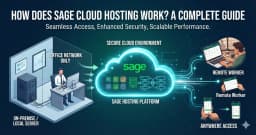
If you want your team to access Sage 100 Contractor remotely, you may need a suitable hosting arrangement. Hosting costs can depend on the number of users, server resources, security requirements, backups, and support services.
Third-party hosting is a separate expense unless it is explicitly included in your software agreement.
If remote access is important to your business, explore Sage 100 hosting to understand how a hosted environment may fit your workflow.
Example: How to Budget for Sage 100 Contractor
Suppose your construction company has five employees who need access to the software.
Using the illustrative third-party estimate of $115–$200 per user per month, the software subscription alone would be:
- Estimated monthly software cost: $575–$1,000
- Estimated annual software cost: $6,900–$12,000
These calculations assume five billable users at the stated illustrative rates. They do not represent an official Sage quote and exclude implementation, training, hosting, taxes, and other potential expenses.
Your actual cost could be different depending on your licensing agreement and business requirements. Confirm whether your quote uses named-user, concurrent-user, or another licensing model before relying on these calculations.
Is Sage 100 Contractor Cloud Hosting Worth the Cost?
Sage 100 Contractor is commonly used for construction accounting and operational management. However, businesses that need access from multiple locations should also consider how the software will be deployed.
Cloud hosting can allow authorized employees to access a compatible hosted application remotely, depending on the hosting configuration and software licensing terms.
Potential benefits include:
- Remote access: Work from supported locations instead of relying exclusively on one office computer.
- Team collaboration: Give authorized employees access to shared business information.
- Centralized data: Work within a common hosted environment rather than maintaining separate local copies.
- Managed infrastructure: Depending on the provider and plan, server maintenance, backups, and security services may be available.
- Business flexibility: Evaluate hosting resources based on your team’s needs and future growth.
Hosting does not automatically eliminate software licensing costs, guarantee uninterrupted access, or include every security and backup service. Review the provider’s service agreement to understand exactly what is covered.
Learn more about cloud hosting solutions from Winscloud Matrix and explore the available options for business applications.
Sage 100 Contractor: Local Installation vs. Cloud Hosting
Your deployment method can influence your overall IT expenses and how your employees access the software.
| Factor | Local installation | Third-party cloud hosting |
|---|---|---|
| Infrastructure | Uses compatible local computers or servers | Uses a hosted server environment |
| Remote access | May require additional remote-access configuration | Can support remote access when properly configured |
| IT management | Your business may manage more infrastructure directly | Some infrastructure management may be handled by the provider |
| Backup responsibility | Depends on your internal backup process | Depends on the hosting plan and backup policy |
| Cost structure | Hardware, maintenance, and IT expenses may apply | Recurring hosting charges may apply |
The right option depends on your budget, IT resources, security requirements, and the software’s technical compatibility. Compare the complete cost of each deployment option rather than looking at the software license alone.
You can also review remote desktop hosting if remote access to business applications is part of your operational plan.
How to Reduce Your Sage 100 Contractor Costs
You may be able to manage your software budget more effectively by reviewing the following areas before purchasing.
Evaluate Your User Requirements
Identify which employees genuinely need access and confirm the applicable licensing terms. Avoid estimating costs using an incorrect user or license model.
Request an Itemized Quote
Ask for separate prices for software, implementation, training, support, additional modules, and hosting. An itemized quote makes it easier to identify optional expenses.
Plan Your Migration in Advance
Organize existing company data and document your accounting workflows before implementation. A clear migration plan can help reduce unnecessary delays and rework.
Compare Deployment Options
Calculate the cost of maintaining local infrastructure against the recurring cost of hosted services. Include hardware, IT support, remote access, backup, and security requirements in your comparison.
Review Your Long-Term Budget
Consider both the initial setup expenses and recurring costs over multiple years. This will give you a more realistic view of the investment required to operate the software.
Frequently Asked Questions About Sage 100 Contractor Pricing
1. Does Sage publish Sage 100 Contractor pricing online?
Sage does not list a standard public price for Sage 100 Contractor on its official US product website. Contact Sage or an authorized reseller for a quote based on your requirements.
2. How much does Sage 100 Contractor cost per user?
Independent estimates published in 2026 commonly suggest approximately $115–$200 per user per month. This is not an official Sage price, and your actual subscription cost may vary.
3. Does Sage 100 Contractor have additional implementation costs?
Implementation, data migration, training, and customization may involve additional charges. Confirm which services are included in your quote.
4. Is cloud hosting included in the Sage 100 Contractor price?
Do not assume hosting is included. Ask your software provider whether the quote covers hosting or whether you need to purchase a separate hosting service.
5. Can I access Sage 100 Contractor remotely?
Remote access depends on your deployment, software compatibility, licensing, and network configuration. A suitable hosted environment may provide remote access for authorized users.
6. Is Sage 100 Contractor suitable for small construction businesses?
It may be suitable for small and growing contractors that need construction-focused accounting, job costing, estimating, and related workflows. Evaluate its features and total cost against your company’s actual requirements.
7. How can I get an accurate Sage 100 Contractor quote?
Contact Sage or an authorized reseller with your expected number of users, required features, deployment preference, implementation needs, and support requirements. Request a written breakdown of recurring and one-time expenses.
Final Thoughts
The cost of Sage 100 Contractor depends on your licensing arrangement, number of users, required features, implementation needs, and deployment method. While third-party estimates can help you create an initial budget, you should obtain a current quote before making a final decision.
Remember to account for more than the software subscription. Training, migration, support, and cloud hosting may affect the total cost of ownership.
If remote access is a priority for your construction business, explore Sage 100 hosting by Winscloud Matrix to learn about hosting options for your workflow.
Winscloud Matrix helps businesses explore hosting solutions for supported accounting and business applications. Confirm software compatibility, licensing requirements, and service inclusions before selecting a hosting plan.